> ## Documentation Index
> Fetch the complete documentation index at: https://docs-dev-fix-cli-comand.mintlify.site/llms.txt
> Use this file to discover all available pages before exploring further.

> Learn how to configure an update policy form using Forms for Actions for users to review and accept new terms of service or consent updates.

# Use Cases: Configure an update policy form using Forms

<Card title="Before you start">
  1. Create a [Machine-to-Machine Application](/docs/get-started/auth0-overview/create-applications/machine-to-machine-apps) with the following scopes enabled:

  * `read:users`
  * `update:users`
  * `create:users`
  * `read:users_app_metadata`
  * `update:users_app_metadata`
  * `create:users_app_metadata`

  2. Add a [Vault connection](/docs/customize/forms/vault) using the M2M application credentials.
</Card>

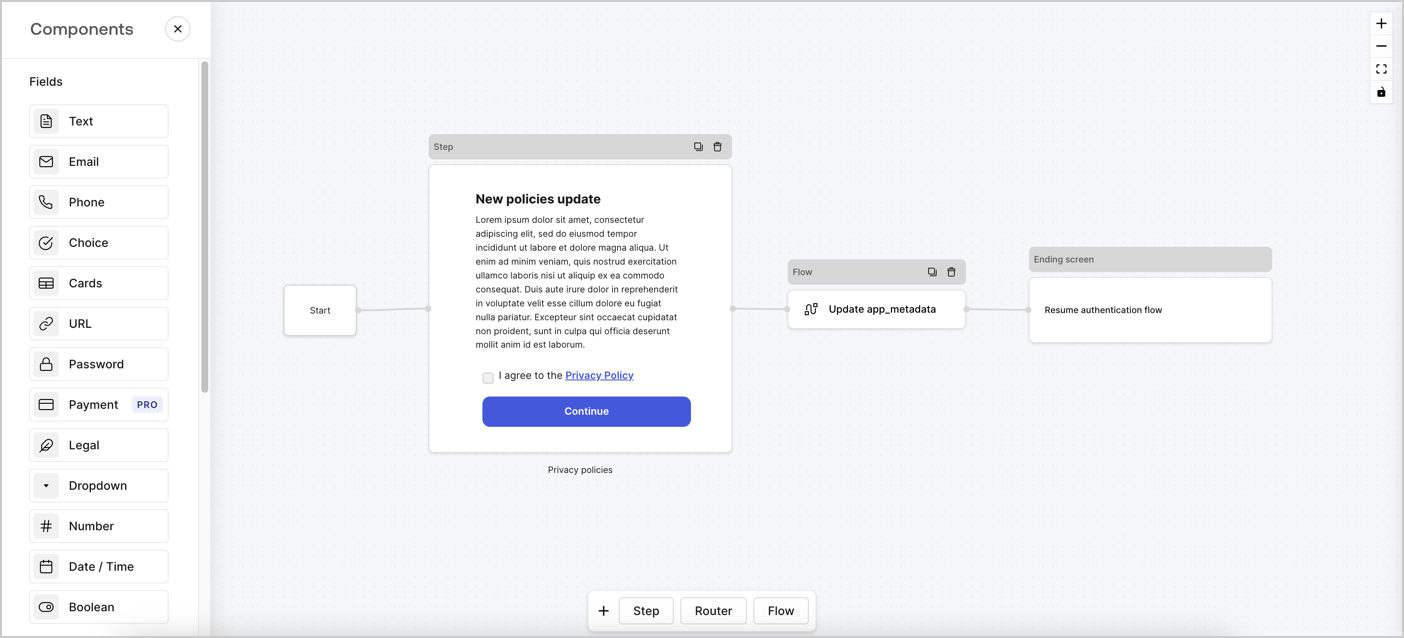
Forms for Actions allows you to create custom privacy policies flows and store the consent under the `app_metadata` object.
<Frame>
  <img src="https://mintcdn.com/docs-dev-fix-cli-comand/66lFq0rZkU2GnQ3s/docs/images/cdy7uua7fh8z/6i68dMvHDTijfRmSgN1x8Q/ad900e7d4c0fb34645921435472b8684/privavy-policy-form.png?fit=max&auto=format&n=66lFq0rZkU2GnQ3s&q=85&s=26317729b13bfefbfe0da3e6ba065635" alt="Dashboard > Actions > Forms > Privacy policy use case" data-og-width="1404" width="1404" data-og-height="638" height="638" data-path="docs/images/cdy7uua7fh8z/6i68dMvHDTijfRmSgN1x8Q/ad900e7d4c0fb34645921435472b8684/privavy-policy-form.png" data-optimize="true" data-opv="3" srcset="https://mintcdn.com/docs-dev-fix-cli-comand/66lFq0rZkU2GnQ3s/docs/images/cdy7uua7fh8z/6i68dMvHDTijfRmSgN1x8Q/ad900e7d4c0fb34645921435472b8684/privavy-policy-form.png?w=280&fit=max&auto=format&n=66lFq0rZkU2GnQ3s&q=85&s=361e89b7ff336a6cbe29091ebcaba994 280w, https://mintcdn.com/docs-dev-fix-cli-comand/66lFq0rZkU2GnQ3s/docs/images/cdy7uua7fh8z/6i68dMvHDTijfRmSgN1x8Q/ad900e7d4c0fb34645921435472b8684/privavy-policy-form.png?w=560&fit=max&auto=format&n=66lFq0rZkU2GnQ3s&q=85&s=af224ac4f1ac5974ee10b8f4793917e7 560w, https://mintcdn.com/docs-dev-fix-cli-comand/66lFq0rZkU2GnQ3s/docs/images/cdy7uua7fh8z/6i68dMvHDTijfRmSgN1x8Q/ad900e7d4c0fb34645921435472b8684/privavy-policy-form.png?w=840&fit=max&auto=format&n=66lFq0rZkU2GnQ3s&q=85&s=b19ba92c798d7428696410b873cab641 840w, https://mintcdn.com/docs-dev-fix-cli-comand/66lFq0rZkU2GnQ3s/docs/images/cdy7uua7fh8z/6i68dMvHDTijfRmSgN1x8Q/ad900e7d4c0fb34645921435472b8684/privavy-policy-form.png?w=1100&fit=max&auto=format&n=66lFq0rZkU2GnQ3s&q=85&s=6be9df96e8ca8437e223f57049b4e6d6 1100w, https://mintcdn.com/docs-dev-fix-cli-comand/66lFq0rZkU2GnQ3s/docs/images/cdy7uua7fh8z/6i68dMvHDTijfRmSgN1x8Q/ad900e7d4c0fb34645921435472b8684/privavy-policy-form.png?w=1650&fit=max&auto=format&n=66lFq0rZkU2GnQ3s&q=85&s=5eafbb0cf91ee1a5524707af1ec07348 1650w, https://mintcdn.com/docs-dev-fix-cli-comand/66lFq0rZkU2GnQ3s/docs/images/cdy7uua7fh8z/6i68dMvHDTijfRmSgN1x8Q/ad900e7d4c0fb34645921435472b8684/privavy-policy-form.png?w=2500&fit=max&auto=format&n=66lFq0rZkU2GnQ3s&q=85&s=35c73a7c2c9c96e098576a48df76ecea 2500w" />
</Frame>

The sections below outline how you can create an Update Policy form using nodes and flows, along with steps for adding your form to a [Post Login](/docs/customize/actions/explore-triggers/signup-and-login-triggers/login-trigger) Action.

## Create a form from scratch

Follow these steps to create a form to gather information:

1. Open the Form editor by selecting **Auth0 Dashboard > Actions > Forms.**
2. Select **Create Form** > **Start from scratch**.

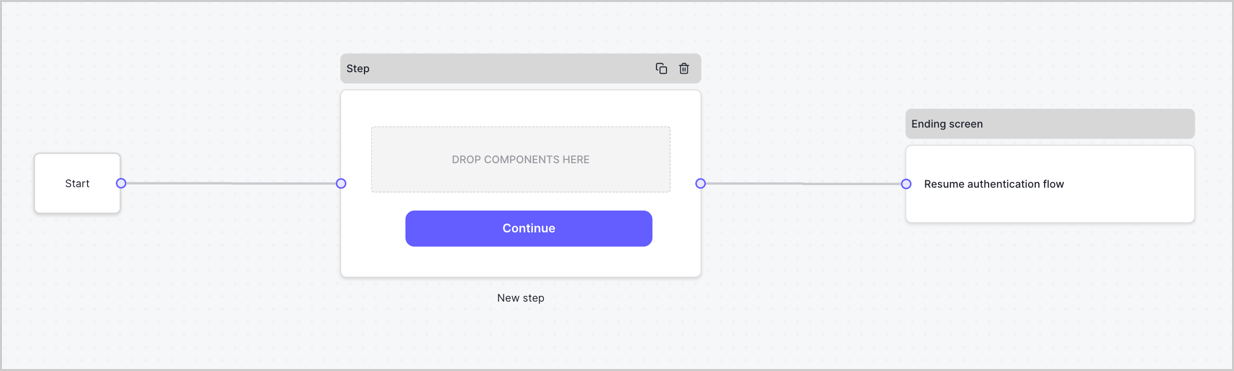
By default, a new form contains a Start node, a Step node, and an Ending screen node.
<Frame>
  <img src="https://mintcdn.com/docs-dev-fix-cli-comand/-zktQDf8AWx71Qwh/docs/images/cdy7uua7fh8z/2TZ9jSjgEcARFpULI6hz4R/a4319a1bd482f2ee5cc23100fdb2f42c/New-form-Forms-for-action-use-case.png?fit=max&auto=format&n=-zktQDf8AWx71Qwh&q=85&s=4eeb470dc56dadc03b85d3003ae04c18" alt="Dashboard > Forms > Use Cases > Form" data-og-width="1234" width="1234" data-og-height="371" height="371" data-path="docs/images/cdy7uua7fh8z/2TZ9jSjgEcARFpULI6hz4R/a4319a1bd482f2ee5cc23100fdb2f42c/New-form-Forms-for-action-use-case.png" data-optimize="true" data-opv="3" srcset="https://mintcdn.com/docs-dev-fix-cli-comand/-zktQDf8AWx71Qwh/docs/images/cdy7uua7fh8z/2TZ9jSjgEcARFpULI6hz4R/a4319a1bd482f2ee5cc23100fdb2f42c/New-form-Forms-for-action-use-case.png?w=280&fit=max&auto=format&n=-zktQDf8AWx71Qwh&q=85&s=db9cf235fe334ec541c2d9c34b6fcd53 280w, https://mintcdn.com/docs-dev-fix-cli-comand/-zktQDf8AWx71Qwh/docs/images/cdy7uua7fh8z/2TZ9jSjgEcARFpULI6hz4R/a4319a1bd482f2ee5cc23100fdb2f42c/New-form-Forms-for-action-use-case.png?w=560&fit=max&auto=format&n=-zktQDf8AWx71Qwh&q=85&s=9cb9ae14c15658e6034c2d364b012ff8 560w, https://mintcdn.com/docs-dev-fix-cli-comand/-zktQDf8AWx71Qwh/docs/images/cdy7uua7fh8z/2TZ9jSjgEcARFpULI6hz4R/a4319a1bd482f2ee5cc23100fdb2f42c/New-form-Forms-for-action-use-case.png?w=840&fit=max&auto=format&n=-zktQDf8AWx71Qwh&q=85&s=84f4740f8ad4aa245573c0aca8a55649 840w, https://mintcdn.com/docs-dev-fix-cli-comand/-zktQDf8AWx71Qwh/docs/images/cdy7uua7fh8z/2TZ9jSjgEcARFpULI6hz4R/a4319a1bd482f2ee5cc23100fdb2f42c/New-form-Forms-for-action-use-case.png?w=1100&fit=max&auto=format&n=-zktQDf8AWx71Qwh&q=85&s=b21865428bc42a0204bbd1e94b3e4e1a 1100w, https://mintcdn.com/docs-dev-fix-cli-comand/-zktQDf8AWx71Qwh/docs/images/cdy7uua7fh8z/2TZ9jSjgEcARFpULI6hz4R/a4319a1bd482f2ee5cc23100fdb2f42c/New-form-Forms-for-action-use-case.png?w=1650&fit=max&auto=format&n=-zktQDf8AWx71Qwh&q=85&s=86e08a481ee85a82051bfc6f6e1bcd82 1650w, https://mintcdn.com/docs-dev-fix-cli-comand/-zktQDf8AWx71Qwh/docs/images/cdy7uua7fh8z/2TZ9jSjgEcARFpULI6hz4R/a4319a1bd482f2ee5cc23100fdb2f42c/New-form-Forms-for-action-use-case.png?w=2500&fit=max&auto=format&n=-zktQDf8AWx71Qwh&q=85&s=1c3685f35ed8a3df13f3ba3d0fea7c07 2500w" />
</Frame>

### Configure the Step node

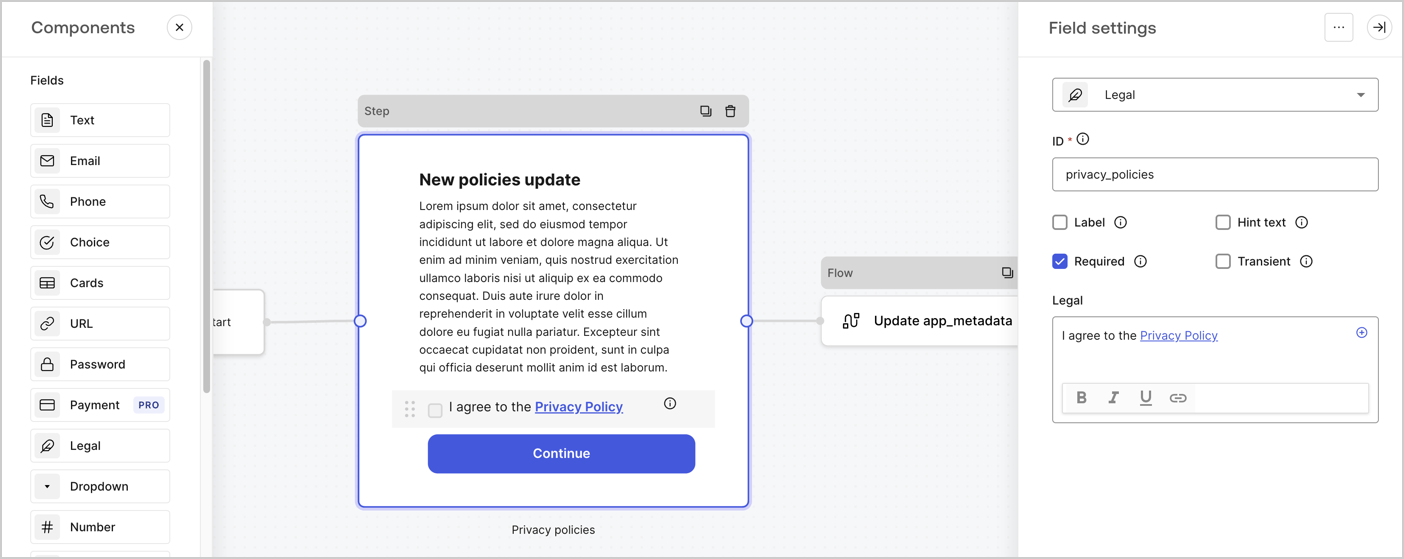
The Step node is the graphical interface visible to users. Add [Fields](/docs/customize/forms/nodes-and-components) to the Step node to collect the new agreement acceptance value by following these steps:

1. Drag a **Rich text** field from the **Components menu** into the **Step** node.

   * **Rich text**: Enter a description of your privacy policies updates.
   * Select **Save**.
2. Drag a **Legal** field into the **Step** node.

   * **ID**: Enter `privacy_policies`.
   * **Required**: Enable the checkbox.
   * **Legal**: Enter `I agree to the Privacy Policy`.
   * Select **Save**.
3. Select **Publish** to save.
<Frame>
  <img src="https://mintcdn.com/docs-dev-fix-cli-comand/dEgV2G21jzsfN1ow/docs/images/cdy7uua7fh8z/59zFFjQjAnjogkc2QGIqqJ/0ad66b1b636544122aa4e65968b76c2c/privacy-policy-step-node.png?fit=max&auto=format&n=dEgV2G21jzsfN1ow&q=85&s=d752991c1fc769c9d18556a9160bb7e0" alt="Dashboard > Actions > Forms > Use case privacy policy step node" data-og-width="1404" width="1404" data-og-height="559" height="559" data-path="docs/images/cdy7uua7fh8z/59zFFjQjAnjogkc2QGIqqJ/0ad66b1b636544122aa4e65968b76c2c/privacy-policy-step-node.png" data-optimize="true" data-opv="3" srcset="https://mintcdn.com/docs-dev-fix-cli-comand/dEgV2G21jzsfN1ow/docs/images/cdy7uua7fh8z/59zFFjQjAnjogkc2QGIqqJ/0ad66b1b636544122aa4e65968b76c2c/privacy-policy-step-node.png?w=280&fit=max&auto=format&n=dEgV2G21jzsfN1ow&q=85&s=da9bb6306489871b1d2071cf662dc06f 280w, https://mintcdn.com/docs-dev-fix-cli-comand/dEgV2G21jzsfN1ow/docs/images/cdy7uua7fh8z/59zFFjQjAnjogkc2QGIqqJ/0ad66b1b636544122aa4e65968b76c2c/privacy-policy-step-node.png?w=560&fit=max&auto=format&n=dEgV2G21jzsfN1ow&q=85&s=26cbba7d7968ec945a05e007b24a5ec8 560w, https://mintcdn.com/docs-dev-fix-cli-comand/dEgV2G21jzsfN1ow/docs/images/cdy7uua7fh8z/59zFFjQjAnjogkc2QGIqqJ/0ad66b1b636544122aa4e65968b76c2c/privacy-policy-step-node.png?w=840&fit=max&auto=format&n=dEgV2G21jzsfN1ow&q=85&s=a78b0d5180f48c71e4a495fcc5546321 840w, https://mintcdn.com/docs-dev-fix-cli-comand/dEgV2G21jzsfN1ow/docs/images/cdy7uua7fh8z/59zFFjQjAnjogkc2QGIqqJ/0ad66b1b636544122aa4e65968b76c2c/privacy-policy-step-node.png?w=1100&fit=max&auto=format&n=dEgV2G21jzsfN1ow&q=85&s=d5220912c39d00a98a96dd5ada6e8cd3 1100w, https://mintcdn.com/docs-dev-fix-cli-comand/dEgV2G21jzsfN1ow/docs/images/cdy7uua7fh8z/59zFFjQjAnjogkc2QGIqqJ/0ad66b1b636544122aa4e65968b76c2c/privacy-policy-step-node.png?w=1650&fit=max&auto=format&n=dEgV2G21jzsfN1ow&q=85&s=939647476a05f8f21ebe78743c9d144e 1650w, https://mintcdn.com/docs-dev-fix-cli-comand/dEgV2G21jzsfN1ow/docs/images/cdy7uua7fh8z/59zFFjQjAnjogkc2QGIqqJ/0ad66b1b636544122aa4e65968b76c2c/privacy-policy-step-node.png?w=2500&fit=max&auto=format&n=dEgV2G21jzsfN1ow&q=85&s=907eda884c639c8efe9a7863d77d903d 2500w" />
</Frame>

### Configure the Flow node

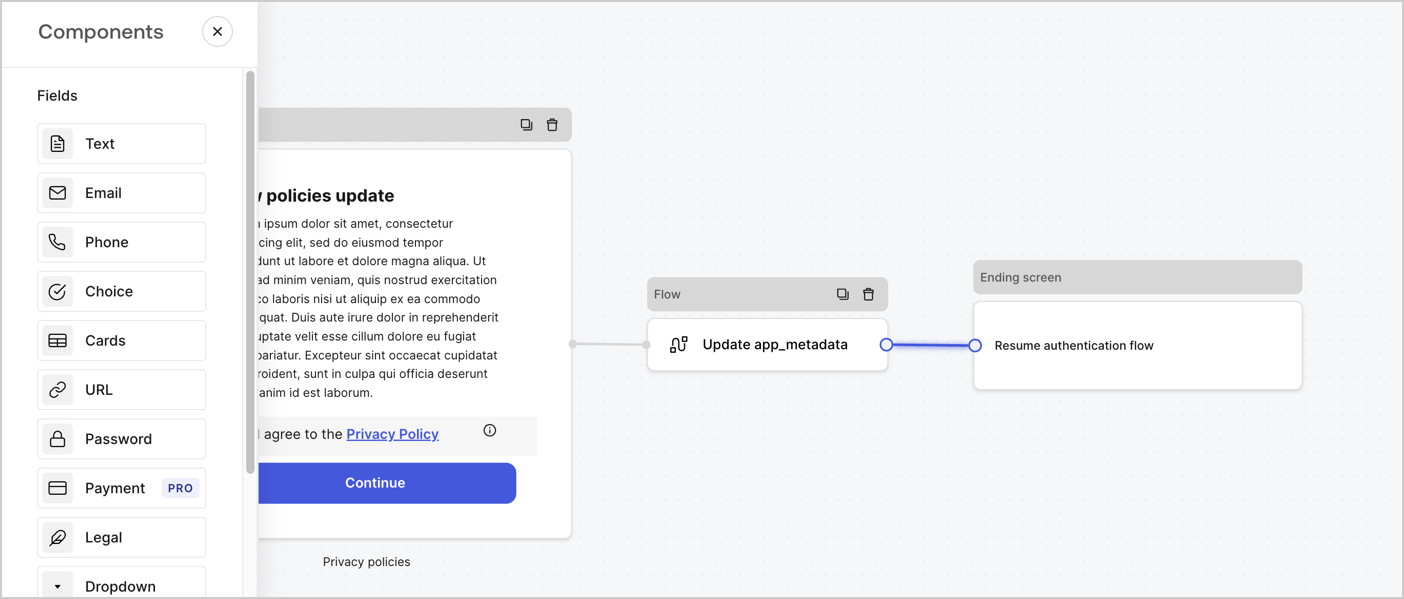
Add a **Flow** node after the **Step** node to update the `app_metadata` and resume the authentication flow by following these steps:

1. Select **Flow** from the bottom of the Form editor.
2. Remove the existing link between the **Step** and **Ending Screen** nodes.
3. Select the new **Flow** > **Click to add a flow** > **Create a new flow.**

   * Enter `Update app_metadata` in the **Name** field.
   * Select **Create**.
   * Select **Save**.
4. Link the **Flow** node to the **Step** and **Ending Screen** nodes as pictured below.
5. Select **Publish** to save.
<Frame>
  <img src="https://mintcdn.com/docs-dev-fix-cli-comand/66lFq0rZkU2GnQ3s/docs/images/cdy7uua7fh8z/6YIkzm7SrpM9LW76AXuRzh/353c518fe82bbaa440836da1d83596d6/link-policies.png?fit=max&auto=format&n=66lFq0rZkU2GnQ3s&q=85&s=2e5be88e864d07115a0b254d0cde125e" alt="Dashboard > Actions > Forms > Form" data-og-width="1404" width="1404" data-og-height="599" height="599" data-path="docs/images/cdy7uua7fh8z/6YIkzm7SrpM9LW76AXuRzh/353c518fe82bbaa440836da1d83596d6/link-policies.png" data-optimize="true" data-opv="3" srcset="https://mintcdn.com/docs-dev-fix-cli-comand/66lFq0rZkU2GnQ3s/docs/images/cdy7uua7fh8z/6YIkzm7SrpM9LW76AXuRzh/353c518fe82bbaa440836da1d83596d6/link-policies.png?w=280&fit=max&auto=format&n=66lFq0rZkU2GnQ3s&q=85&s=da88ad807eebf7d070d078223e84d447 280w, https://mintcdn.com/docs-dev-fix-cli-comand/66lFq0rZkU2GnQ3s/docs/images/cdy7uua7fh8z/6YIkzm7SrpM9LW76AXuRzh/353c518fe82bbaa440836da1d83596d6/link-policies.png?w=560&fit=max&auto=format&n=66lFq0rZkU2GnQ3s&q=85&s=f5842b9e6d597987573ce52c21ad4b6b 560w, https://mintcdn.com/docs-dev-fix-cli-comand/66lFq0rZkU2GnQ3s/docs/images/cdy7uua7fh8z/6YIkzm7SrpM9LW76AXuRzh/353c518fe82bbaa440836da1d83596d6/link-policies.png?w=840&fit=max&auto=format&n=66lFq0rZkU2GnQ3s&q=85&s=0943427eacef8426f977998bbfb8b855 840w, https://mintcdn.com/docs-dev-fix-cli-comand/66lFq0rZkU2GnQ3s/docs/images/cdy7uua7fh8z/6YIkzm7SrpM9LW76AXuRzh/353c518fe82bbaa440836da1d83596d6/link-policies.png?w=1100&fit=max&auto=format&n=66lFq0rZkU2GnQ3s&q=85&s=a626d44fecd7d798133a1a92f322c12e 1100w, https://mintcdn.com/docs-dev-fix-cli-comand/66lFq0rZkU2GnQ3s/docs/images/cdy7uua7fh8z/6YIkzm7SrpM9LW76AXuRzh/353c518fe82bbaa440836da1d83596d6/link-policies.png?w=1650&fit=max&auto=format&n=66lFq0rZkU2GnQ3s&q=85&s=6374a6cd68d508fa797bdf15f3ea6735 1650w, https://mintcdn.com/docs-dev-fix-cli-comand/66lFq0rZkU2GnQ3s/docs/images/cdy7uua7fh8z/6YIkzm7SrpM9LW76AXuRzh/353c518fe82bbaa440836da1d83596d6/link-policies.png?w=2500&fit=max&auto=format&n=66lFq0rZkU2GnQ3s&q=85&s=5b0a91837077831659933d68d44e2512 2500w" />
</Frame>

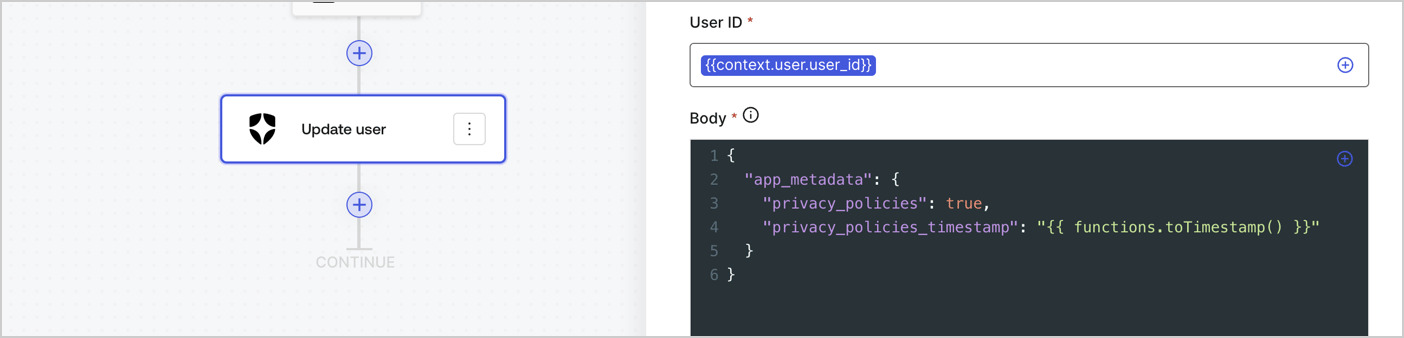
Add an Auth0 Update user action to the flow by following these steps:

1. Select the **Flow** **Update app\_metadata** > **Edit flow** to open the Flow editor in a new tab.
2. Below the StartAction, select the **+** icon to add an **Update user** action. Complete the fields below, then select **Save** to continue.

   * **Connection**: Select from the dropdown the Vault connection to your M2M application.

   * **User ID**: Enter `{{context.user.user_id}}`.

   * **Body**: Copy and paste the following code to update the app\_metadata with the privacy\_policies and privacy\_policies\_timestamp properties.

     ```text lines theme={null}
     {
       "app_metadata": {
         "privacy_policies": true,
         "privacy_policies_timestamp": "{{ functions.toTimestamp() }}"
       }
     }
     ```

   * Select **Save**.
3. Select **Publish** to save.
<Frame>
  <img src="https://mintcdn.com/docs-dev-fix-cli-comand/y4-rteOCt1_1cWtw/docs/images/cdy7uua7fh8z/CvMNIwWrOUwaFW4X3G28p/1fb70ae57a20749d9ffaaba8dc0b7e26/update-user-privacy.png?fit=max&auto=format&n=y4-rteOCt1_1cWtw&q=85&s=80ee1be48803c2d90060fe76ba226c15" alt="Dashboard > Actions > Forms > User case privacy policy code" data-og-width="1404" width="1404" data-og-height="338" height="338" data-path="docs/images/cdy7uua7fh8z/CvMNIwWrOUwaFW4X3G28p/1fb70ae57a20749d9ffaaba8dc0b7e26/update-user-privacy.png" data-optimize="true" data-opv="3" srcset="https://mintcdn.com/docs-dev-fix-cli-comand/y4-rteOCt1_1cWtw/docs/images/cdy7uua7fh8z/CvMNIwWrOUwaFW4X3G28p/1fb70ae57a20749d9ffaaba8dc0b7e26/update-user-privacy.png?w=280&fit=max&auto=format&n=y4-rteOCt1_1cWtw&q=85&s=408bc0531afa98a7f3645113357228fb 280w, https://mintcdn.com/docs-dev-fix-cli-comand/y4-rteOCt1_1cWtw/docs/images/cdy7uua7fh8z/CvMNIwWrOUwaFW4X3G28p/1fb70ae57a20749d9ffaaba8dc0b7e26/update-user-privacy.png?w=560&fit=max&auto=format&n=y4-rteOCt1_1cWtw&q=85&s=ec428339080ab63e1276b2c90b6cae59 560w, https://mintcdn.com/docs-dev-fix-cli-comand/y4-rteOCt1_1cWtw/docs/images/cdy7uua7fh8z/CvMNIwWrOUwaFW4X3G28p/1fb70ae57a20749d9ffaaba8dc0b7e26/update-user-privacy.png?w=840&fit=max&auto=format&n=y4-rteOCt1_1cWtw&q=85&s=8c9eb9a80b385ba4069ac5d86f40375b 840w, https://mintcdn.com/docs-dev-fix-cli-comand/y4-rteOCt1_1cWtw/docs/images/cdy7uua7fh8z/CvMNIwWrOUwaFW4X3G28p/1fb70ae57a20749d9ffaaba8dc0b7e26/update-user-privacy.png?w=1100&fit=max&auto=format&n=y4-rteOCt1_1cWtw&q=85&s=754f9687659e71cc8a60a7a682ef5daf 1100w, https://mintcdn.com/docs-dev-fix-cli-comand/y4-rteOCt1_1cWtw/docs/images/cdy7uua7fh8z/CvMNIwWrOUwaFW4X3G28p/1fb70ae57a20749d9ffaaba8dc0b7e26/update-user-privacy.png?w=1650&fit=max&auto=format&n=y4-rteOCt1_1cWtw&q=85&s=1944067ddf3cf748b07712585b12e58b 1650w, https://mintcdn.com/docs-dev-fix-cli-comand/y4-rteOCt1_1cWtw/docs/images/cdy7uua7fh8z/CvMNIwWrOUwaFW4X3G28p/1fb70ae57a20749d9ffaaba8dc0b7e26/update-user-privacy.png?w=2500&fit=max&auto=format&n=y4-rteOCt1_1cWtw&q=85&s=c99586ecd4f782cac87d0a02109ff7dc 2500w" />
</Frame>

<Callout icon="file-lines" color="#0EA5E9" iconType="regular">
  The flow **Update app\_metadata** adds a `privacy_policies true` value to the app`_metadata` object and also generates a timestamp with a [helper function.](/docs/customize/forms/variables)
</Callout>

## Retrieve the form render code

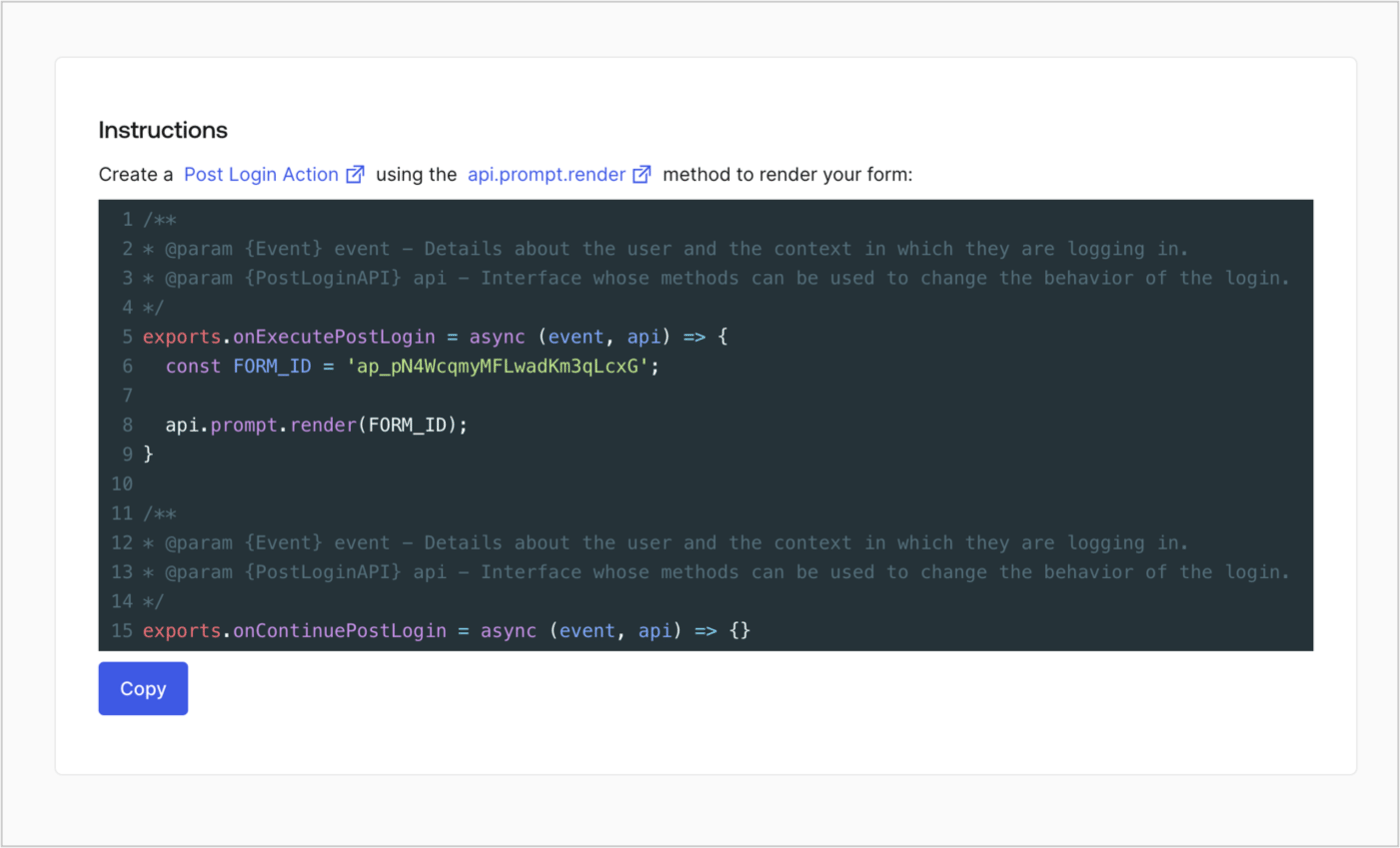
Retrieve your form render code to visually render the form with a custom Post Login Action by following these steps:

* From the Form editor, select **`<> Render`**.
* Select **Copy**.
<Frame>
  <img src="https://mintcdn.com/docs-dev-fix-cli-comand/0D7TmyvO_2znNvQt/docs/images/cdy7uua7fh8z/2EIUzc539sq9lwoTKbjoJv/496a864c0fc44a782c9cadca119dbfb0/embed.png?fit=max&auto=format&n=0D7TmyvO_2znNvQt&q=85&s=a920f86f42a74bfee6ef654d050466ca" alt="Dashboard > Actions > Forms > Form > Embed" data-og-width="1400" width="1400" data-og-height="848" height="848" data-path="docs/images/cdy7uua7fh8z/2EIUzc539sq9lwoTKbjoJv/496a864c0fc44a782c9cadca119dbfb0/embed.png" data-optimize="true" data-opv="3" srcset="https://mintcdn.com/docs-dev-fix-cli-comand/0D7TmyvO_2znNvQt/docs/images/cdy7uua7fh8z/2EIUzc539sq9lwoTKbjoJv/496a864c0fc44a782c9cadca119dbfb0/embed.png?w=280&fit=max&auto=format&n=0D7TmyvO_2znNvQt&q=85&s=ee034408142c139fbe5bba5538201567 280w, https://mintcdn.com/docs-dev-fix-cli-comand/0D7TmyvO_2znNvQt/docs/images/cdy7uua7fh8z/2EIUzc539sq9lwoTKbjoJv/496a864c0fc44a782c9cadca119dbfb0/embed.png?w=560&fit=max&auto=format&n=0D7TmyvO_2znNvQt&q=85&s=14cb743e7c4dcf4f256ad4e0c3fd89ac 560w, https://mintcdn.com/docs-dev-fix-cli-comand/0D7TmyvO_2znNvQt/docs/images/cdy7uua7fh8z/2EIUzc539sq9lwoTKbjoJv/496a864c0fc44a782c9cadca119dbfb0/embed.png?w=840&fit=max&auto=format&n=0D7TmyvO_2znNvQt&q=85&s=72b2af5c84c78457e98bddfb67ef2eda 840w, https://mintcdn.com/docs-dev-fix-cli-comand/0D7TmyvO_2znNvQt/docs/images/cdy7uua7fh8z/2EIUzc539sq9lwoTKbjoJv/496a864c0fc44a782c9cadca119dbfb0/embed.png?w=1100&fit=max&auto=format&n=0D7TmyvO_2znNvQt&q=85&s=fa5e0d8c6810b9fdb13c765957a58eac 1100w, https://mintcdn.com/docs-dev-fix-cli-comand/0D7TmyvO_2znNvQt/docs/images/cdy7uua7fh8z/2EIUzc539sq9lwoTKbjoJv/496a864c0fc44a782c9cadca119dbfb0/embed.png?w=1650&fit=max&auto=format&n=0D7TmyvO_2znNvQt&q=85&s=b187b760e15012ef26d599d0f93c91de 1650w, https://mintcdn.com/docs-dev-fix-cli-comand/0D7TmyvO_2znNvQt/docs/images/cdy7uua7fh8z/2EIUzc539sq9lwoTKbjoJv/496a864c0fc44a782c9cadca119dbfb0/embed.png?w=2500&fit=max&auto=format&n=0D7TmyvO_2znNvQt&q=85&s=16f2697b6a89066c5717a374bb46787b 2500w" />
</Frame>

## Create a Post Login Action

Create a post-login Action to render your form by following these steps:

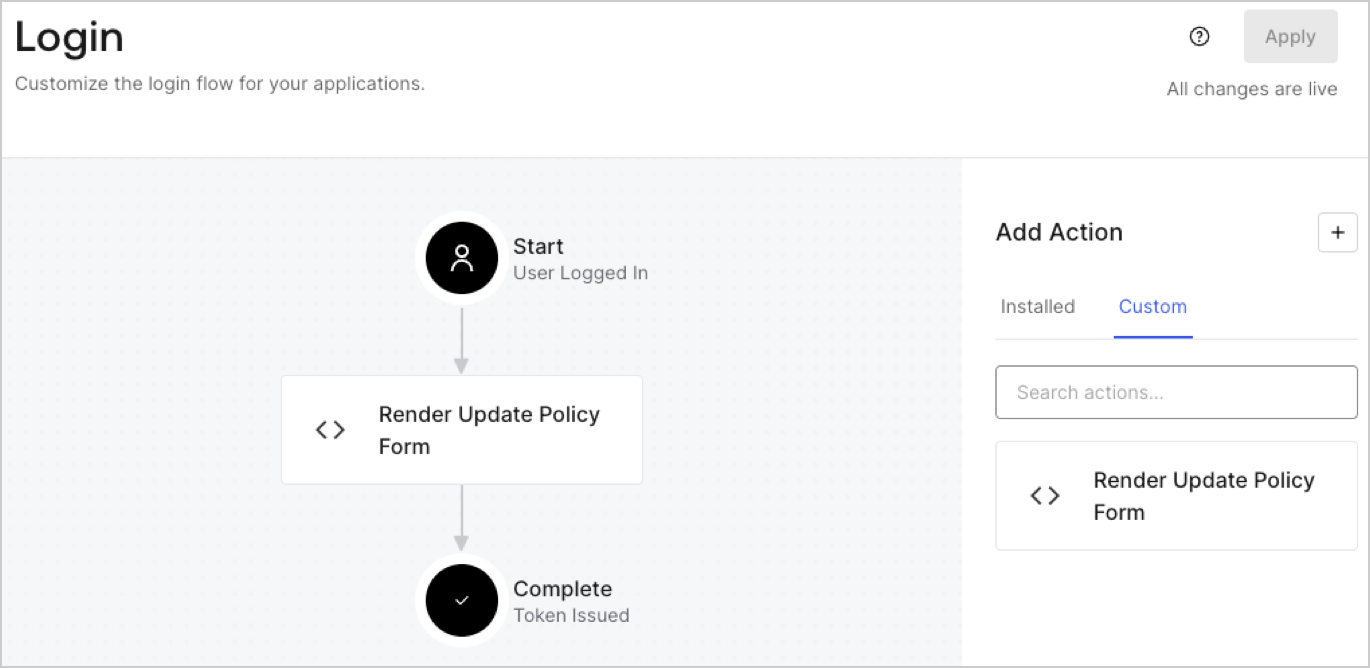
1. Navigate to **Auth0 Dashboard > Actions > Flows > Login.**
2. Select the **+** icon and Select **Build from scratch**:

   * **Name**: Enter `Render Update Policy Form`.
   * **Trigger**: Select `Login / Post Login`.
   * **Runtime**: Select the recommended version.
3. Select **Create**.

To configure the post-login Action:

1. Delete the existing code from the Code editor.
2. Paste the form render code into the Code editor.
3. Edit the code to define the conditional logic that will render the form.

   ```javascript lines theme={null}
   /**
   * @param {Event} event - Details about the user and the context in which they are logging in.
   * @param {PostLoginAPI} api - Interface whose methods can be used to change the behavior of the login.
   */
   exports.onExecutePostLogin = async (event, api) => {
     const FORM_ID = 'REPLACE_WITH_YOUR_FORM_ID';

     if (event.user.app_metadata.privacy_policies !== true) {
       api.prompt.render(FORM_ID);
     }
   }

   exports.onContinuePostLogin = async (event, api) => { }
   ```

   <Callout icon="file-lines" color="#0EA5E9" iconType="regular">
     The example code above will render the form when a user is missing the app metadata `privacy_policies` property.
   </Callout>
4. Select **Deploy.**
5. Drag and Drop the **Render Update Policy Form** Action to the **Login** flow.
   <Frame>
     <img src="https://mintcdn.com/docs-dev-fix-cli-comand/KWap9oqnShvkCXCg/docs/images/cdy7uua7fh8z/5TOwDgevZsBqd7yZynUYWU/41ca909dc3007aed4f40ff794a05efa5/postlogin.png?fit=max&auto=format&n=KWap9oqnShvkCXCg&q=85&s=3507877d36257779215a41e95fd55bd4" alt="Dashboard > Forms > Use Case > Render update policy form login action" data-og-width="1370" width="1370" data-og-height="668" height="668" data-path="docs/images/cdy7uua7fh8z/5TOwDgevZsBqd7yZynUYWU/41ca909dc3007aed4f40ff794a05efa5/postlogin.png" data-optimize="true" data-opv="3" srcset="https://mintcdn.com/docs-dev-fix-cli-comand/KWap9oqnShvkCXCg/docs/images/cdy7uua7fh8z/5TOwDgevZsBqd7yZynUYWU/41ca909dc3007aed4f40ff794a05efa5/postlogin.png?w=280&fit=max&auto=format&n=KWap9oqnShvkCXCg&q=85&s=9ca0374ee9ef24b54df29f2f923602ce 280w, https://mintcdn.com/docs-dev-fix-cli-comand/KWap9oqnShvkCXCg/docs/images/cdy7uua7fh8z/5TOwDgevZsBqd7yZynUYWU/41ca909dc3007aed4f40ff794a05efa5/postlogin.png?w=560&fit=max&auto=format&n=KWap9oqnShvkCXCg&q=85&s=81f735d9031801944e6d52b3e39b1244 560w, https://mintcdn.com/docs-dev-fix-cli-comand/KWap9oqnShvkCXCg/docs/images/cdy7uua7fh8z/5TOwDgevZsBqd7yZynUYWU/41ca909dc3007aed4f40ff794a05efa5/postlogin.png?w=840&fit=max&auto=format&n=KWap9oqnShvkCXCg&q=85&s=cf17eeee68675137b74c76d8fb6baa29 840w, https://mintcdn.com/docs-dev-fix-cli-comand/KWap9oqnShvkCXCg/docs/images/cdy7uua7fh8z/5TOwDgevZsBqd7yZynUYWU/41ca909dc3007aed4f40ff794a05efa5/postlogin.png?w=1100&fit=max&auto=format&n=KWap9oqnShvkCXCg&q=85&s=4a8f24f8b82598a7194d2537931b4540 1100w, https://mintcdn.com/docs-dev-fix-cli-comand/KWap9oqnShvkCXCg/docs/images/cdy7uua7fh8z/5TOwDgevZsBqd7yZynUYWU/41ca909dc3007aed4f40ff794a05efa5/postlogin.png?w=1650&fit=max&auto=format&n=KWap9oqnShvkCXCg&q=85&s=ef53b732690e20719a1b4ed8793e7eff 1650w, https://mintcdn.com/docs-dev-fix-cli-comand/KWap9oqnShvkCXCg/docs/images/cdy7uua7fh8z/5TOwDgevZsBqd7yZynUYWU/41ca909dc3007aed4f40ff794a05efa5/postlogin.png?w=2500&fit=max&auto=format&n=KWap9oqnShvkCXCg&q=85&s=9e57d1bb627e4180b59d371c5c58a2be 2500w" />
   </Frame>
6. Select **Apply.**

### Test implementation

Test the implementation by following these steps:

1. Log in with an existing user whose app`_metadata` attribute `privacy_policies` does not have a value.
2. The post-login Action in the Login flow will render the form and prompt for acceptance.
3. Select **Auth0 Dashboard > User Management > Users,** locate the user and verify that the `app_metadata` attribute `privacy_policies` contains a `true` value and a timestamp.
